
Product
Build planner
Most build plans are a wishlist in list order: the exciting parts first, the supporting work discovered mid-install, and a total cost nobody has added up.
How BuildBay handles it
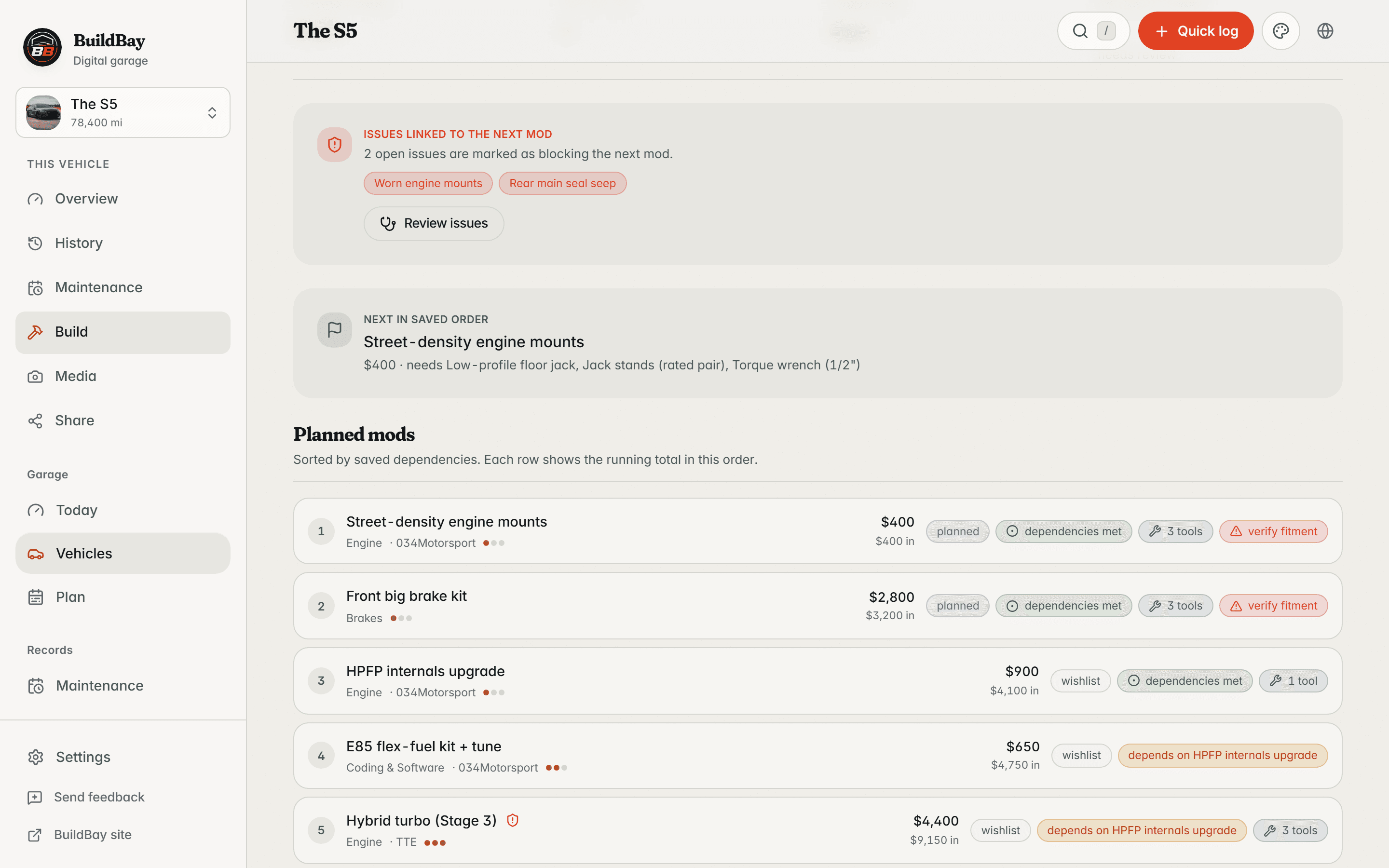
BuildBay’s build plan orders planned mods by the dependencies you declare between them. The order is computed, not curated: a step that depends on unfinished work shows as blocked, with the blocker named.
The plan carries a running cost as it grows, and checks each step against your tool inventory so the tool gap is visible before the parts arrive.
In detail
- Dependency order
- Declare that one mod depends on another and the plan sorts itself. Supporting work surfaces ahead of the mods that need it.
- Blocked-by, named
- A step that cannot start yet says why, pointing at the exact mods that have to land first.
- Running cost
- The plan shows a running cost as steps are added, so the total is known before anything is ordered.
- Tool gaps up front
- Each planned step lists the required tools you do not own yet, while the car is still in one piece.
Who it is for
- Builders sequencing a multi-stage project.
- Anyone who has ordered a part before the work it depended on was done.
- Owners budgeting a build over months instead of one weekend.
Related features
In the library
Keep this with the vehicle
BuildBay is in early access. Join the waitlist and add your first vehicle when the door opens.